Flashcards for people who scroll

Study the way you already scroll.

Flash Feed turns your notes, textbook pages and PDFs into flashcards and serves them one at a time, each card right before you'd forget it.

Coming soon to the App StoreBrowse free decks
  • Free to study
  • No account
  • No ads
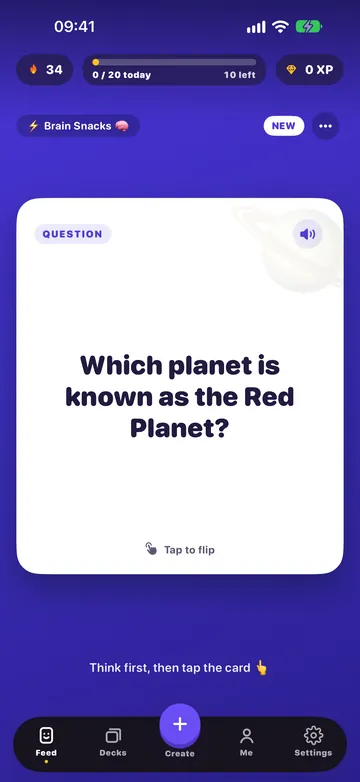
Flash Feed showing a flashcard: Which planet is known as the Red Planet?
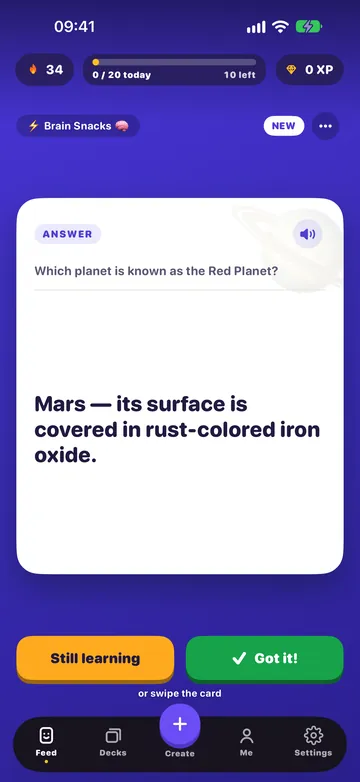
The same card flipped, with the Still learning and Got it! buttons

Try it

Tap the card. Then tell it how you did.

This is how every card in Flash Feed works. Tap to flip, then rate it. Cards you know come back later; cards you missed come back sooner.

Space & physics1 of 3

You're all caught up!

That's the whole idea: when you're done, the app says so instead of inventing more work.

Why Flash Feed

Studying, without the homework feeling.

One card per screen

A feed that makes you smarter.

You scroll anyway. Flash Feed gives that habit a better feed: one card per screen. Tap to flip, swipe to rate, tap the speaker to hear it read aloud. Two minutes on the bus is a real session. And when you're done for the day, the app says so instead of inventing more work.
The same card flipped, with the Still learning and Got it! buttons

Your own material

Start from the pages you're actually studying.

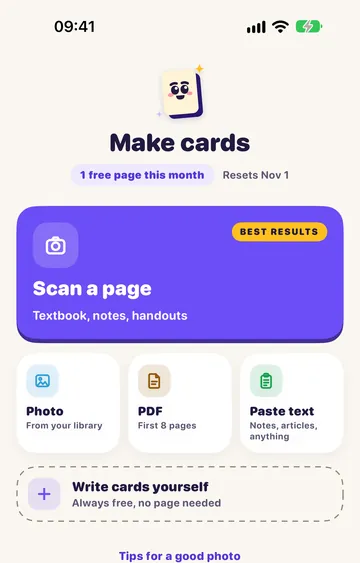
Photograph a textbook page, scan a handout, drop in a PDF or paste your notes. Flash Feed turns them into cards that match what your class really covers. Prefer your own words? Write cards yourself: it's free, and it never counts against anything.

Your own material

Spaced repetition

Cards come back right before you'd forget.

Flash Feed schedules every card with FSRS, a modern open-source spaced-repetition algorithm. Cards you find easy stretch out for weeks. Cards you keep missing come back tomorrow.

Habits, kindly

Streaks that aren't cruel.

Turning up counts, even on a day with nothing due. Miss a day and a Streak Shield you earned covers it. There are no “you'll lose everything” notifications, because that isn't how anyone learns.

12 day streak
MTWTFSS
Streak Shield: covered yesterday

Always within reach

On your Home Screen, Lock Screen and wrist.

A widget shows how many cards are ready. Reminders learn the time you actually study, and stay quiet when you've already done your cards. The Apple Watch app lets you flip through a few on the go.

10
10 ready
Space & physics1 of 3
Which planet is closest to the Sun?
Still learningGot it!

Yours to keep

No account. No ads. Export anytime.

Your decks live on your iPhone, and you can export any of them whenever you like. Bring decks from other flashcard apps (.apkg, .csv, .tsv), or share one with a friend as a file.

.apkg.csv.tsv

Everything in one app

Small things that make it stick.

  • Photo, PDF or paste

    Turn a textbook page, a scan or your notes into cards in seconds.

  • Tap, swipe, listen

    Flip with a tap, rate with a swipe, and hear any card read aloud with the voices already on your iPhone.

  • Spaced repetition

    Cards are scheduled with FSRS, so you review what you're about to forget.

  • Streaks, XP and quests

    Small wins that add up, without the guilt.

  • Reminders that know when to be quiet

    They learn when you study, and stay silent once you're done.

  • Works with Share

    Send text from Safari or Notes, or a screenshot from Photos, straight to Flash Feed.

  • Import and export

    Bring decks from other apps (.apkg, .csv, .tsv). Export yours any time.

  • Starter decks

    Eight starter decks, so you're studying in seconds.

Ten languages

Speaks your language. Studies in yours.

The app comes in English, Türkçe, Deutsch, Español, Français, Italiano, Português, 日本語, 한국어 and 简体中文. Your cards can be in whatever language your own pages are in.

  • English
  • Türkçe
  • Deutsch
  • Español
  • Français
  • Italiano
  • Português
  • 日本語
  • 한국어
  • 简体中文

Questions

Good to know

Is Flash Feed free?

Studying is always free, and so are importing decks and writing your own cards. Making cards from a page (a photo, a scan, a PDF or pasted text) is free for one page each calendar month, however many cards it makes. To make more, there's a monthly or yearly plan; prices are shown in the App Store, in your currency.

Do I need an account?

No. There is no account to make, and there are no ads.

Which iPhones does it work on?

Any iPhone running iOS 18 or later. Making cards on your phone needs Apple Intelligence; on other iPhones the cards are made on our server, after you agree.

Is my data private?

Photos never leave your phone: the text is read right there. Your decks and progress live on your iPhone. When cards are written by our server, which only happens after you agree, it receives the page's text, never the photo. The Privacy Policy has the details.

How does Flash Feed decide when to show a card?

With FSRS, a modern open-source spaced-repetition algorithm. Cards you find easy stretch out for weeks; cards you keep missing come back tomorrow.

Can I bring decks from another app?

Yes. Flash Feed imports Anki decks (.apkg) and CSV, TSV or text files, and you can export any deck whenever you like.

Which languages does it support?

The app is available in English, Turkish, German, Spanish, French, Italian, Portuguese, Japanese, Korean and Simplified Chinese. Your cards can be written in the language of your own pages.

When can I get it?

Flash Feed is coming to the App Store soon. This page gets the download button the day it's out.

Your first deck in seconds.

Pick a starter deck, or snap a page you're studying right now.

Coming soon to the App StoreBrowse free decks